
Measuring Compliance With Code and AI
Key Concept
What gets measured gets managed. What gets measured automatically gets managed well.
Continuous Compliance: Instead of periodic reviews that find problems months later, check every transaction against your rules as it happens.
Figures (Full Resolution)
Figure 6.1: Slack Notification
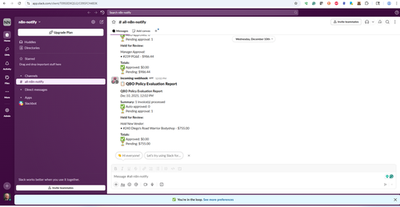 Real-time policy notification in Slack: Invoice #4847 flagged for missing business purpose. The team sees issues within hours, not months.
Figure 6.2: Compliance Dashboard
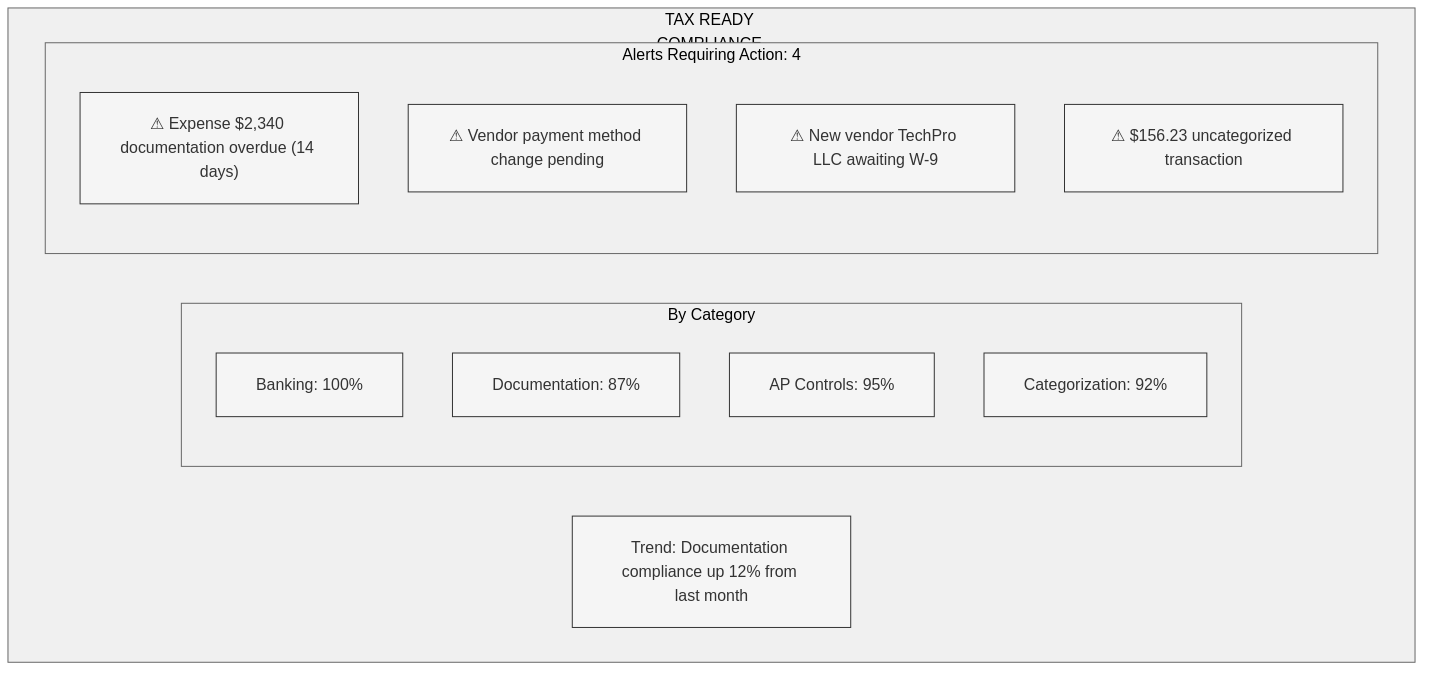 The compliance dashboard showing status across all policy areas: documentation rate, approval compliance, vendor verification, and reconciliation status.
Downloadable Resources
Checklists & Templates
- 5 Policies to Automate First (PDF) – Start here for maximum impact
- Compliance Dashboard Template – Track your metrics
- Operational Rhythm Calendar – Daily, weekly, monthly checks
- Chart of Accounts Monitoring Rules – What to watch in your COA
The Audit That Never Ends (In a Good Way)
Traditional compliance checking is periodic: – Once a month (if you’re diligent) – Once a quarter (more common) – Once a year (when your CPA reviews)
What happens between those checks? Problems accumulate. Small errors compound. By the time someone looks, there’s a backlog.
Continuous compliance flips this: Every transaction, every day, checked against your rules. Violations flagged within hours. Patterns detected before they become problems.
How Invoice #4847 Gets Monitored
When Invoice #4847 enters the system, here’s what happens automatically:
| Check | Rule | Result | Action |
|---|---|---|---|
| Vendor status | Is vendor fully onboarded? | ✓ Pass | Continue |
| Amount threshold | Does amount exceed $2,000? | ✓ Yes | Route to manager |
| Documentation | Is business purpose provided? | ✗ Fail | Flag + notify |
| Categorization | Is expense account valid? | ✓ Pass | Continue |
| Duplicate check | Is this a duplicate entry? | ✓ No duplicates | Continue |
| Timeline | Within 10-day documentation window? | ⚠ Day 7 | Warning |
Total time: Under 2 seconds. Human involvement: Zero (until action needed).
The 5 Policies to Automate First
Start with high-impact, low-complexity policies:
1. Documentation Deadline
Policy: Business purpose required within 10 days
Rule: IF days_since(transaction) > 10 AND no_documentation THEN alert
Impact: Catches 80% of year-end scramble issues
2. Approval Thresholds
Policy: Expenses over $X require manager approval
Rule: IF amount > threshold THEN route_to_approver
Impact: Prevents unauthorized spending, creates audit trail
3. Vendor Verification
Policy: No payment to unapproved vendors
Rule: IF vendor.status != "approved" THEN block_payment
Impact: Prevents fraud, ensures 1099 compliance
4. Categorization Validation
Policy: No transactions to suspense accounts
Rule: IF account IN ("Ask My Accountant", "Uncategorized") THEN flag
Impact: Keeps books clean, reduces cleanup
5. Reconciliation Monitoring
Policy: Bank reconciliation within 30 days
Rule: IF days_since(last_reconciliation) > 30 THEN alert_owner
Impact: Catches errors early, prevents fraud
What the Compliance Dashboard Shows
A well-designed compliance dashboard answers these questions at a glance:
Category 1: Documentation
| Metric | Target | How to Measure |
|---|---|---|
| Documentation rate | >95% | Transactions with business purpose / Total transactions |
| Average documentation time | <5 days | Days between transaction and documentation |
| Overdue items | 0 | Count of items past 10-day window |
Category 2: Approvals
| Metric | Target | How to Measure |
|---|---|---|
| Approval compliance | 100% | Approved transactions / Transactions requiring approval |
| Average approval time | <2 days | Days in approval queue |
| Pending approvals | <10 | Count of items awaiting approval |
Category 3: Vendor Compliance
| Metric | Target | How to Measure |
|---|---|---|
| Vendor W-9 rate | 100% | Vendors with W-9 / 1099-eligible vendors |
| New vendor processing | <7 days | Days from request to approved |
| Vendor verification rate | 100% | Verified vendors / Total active vendors |
Category 4: Reconciliation
| Metric | Target | How to Measure |
|---|---|---|
| Reconciliation currency | <30 days | Days since last reconciliation |
| Undeposited funds | <$500 | Balance in undeposited funds |
| For Review items | 0 | Unprocessed bank feed items |
COA Monitoring: What to Watch
Your Chart of Accounts tells a story. These accounts should trigger alerts:
| Account | Target Balance | Alert If |
|---|---|---|
| Ask My Accountant | $0.00 | Any balance |
| Uncategorized Income | $0.00 | Any balance |
| Uncategorized Expense | $0.00 | Any balance |
| Undeposited Funds | Near $0 | Over $500 for >7 days |
| Opening Balance Equity | $0.00 | Any balance (after setup) |
| Suspense | $0.00 | Any balance |
Pro Tip: Set up a weekly report that shows balances in these accounts. If any show a balance, investigate immediately.
The QBO Scheduling Gap
QuickBooks Online is powerful but has one significant limitation: no built-in scheduling for automated checks.
QBO expects you to: – Remember to run reports – Manually review for issues – Follow up on problems yourself
The solution: External automation tools (n8n, Zapier, Make) that: – Pull data from QBO on a schedule – Run your policy checks automatically – Send alerts when issues are found – Create tasks for follow-up
This is where “policies that run” becomes reality.
The Human Role
Automation doesn’t replace human judgment—it focuses it.
What Automation Does:
- Catches obvious violations (missing data, threshold breaches)
- Flags patterns (unusual activity, timing anomalies)
- Routes exceptions to the right person
- Creates audit trail automatically
What Humans Do:
- Make judgment calls on flagged items
- Handle exceptions that require context
- Approve or reject based on business knowledge
- Investigate patterns that automation surfaces
The goal: Humans spend time on decisions that require judgment, not on finding problems that should be obvious.
Case Study: From Monthly to Continuous
Client: Healthcare services company, 30 employees
Before (Monthly Review)
- Finance manager spent 8 hours/month reviewing transactions
- Found issues 30-45 days after they occurred
- 15% of transactions had documentation problems
- Year-end cleanup took 40+ hours
After (Continuous Monitoring)
- Automated checks run hourly
- Issues flagged within hours of occurrence
- 2% of transactions have documentation problems (caught within 10 days)
- Year-end cleanup took 4 hours
Key Metrics Improvement
| Metric | Before | After | Change |
|---|---|---|---|
| Documentation rate | 85% | 98% | +13% |
| Time to catch issues | 30-45 days | <24 hours | -98% |
| Year-end cleanup | 40 hours | 4 hours | -90% |
| Manual review time | 8 hrs/month | 2 hrs/month | -75% |
Operational Rhythm Calendar
Daily (Automated)
Bank feed sync check
New transaction policy evaluation
Approval queue monitoring
Alert delivery
Weekly (15 minutes)
Review compliance dashboard
Address any flagged items
Clear “For Review” in bank feeds
Check undeposited funds
Monthly (1 hour)
Complete bank reconciliation
Review COA monitoring accounts
Vendor W-9 compliance check
Run and review key reports
Quarterly (2 hours)
Full scorecard assessment
Policy effectiveness review
Process improvement identification
Team training on issues found
Key Takeaways
- Continuous beats periodic – Problems caught in hours, not months
- Start with 5 policies – Documentation, approvals, vendors, categorization, reconciliation
- Dashboard makes invisible visible – Compliance at a glance
- QBO needs external automation – It won’t schedule checks for you
- Humans focus on judgment – Let automation handle the obvious
Your Next Step
Pick ONE of the 5 policies to automate first. For most businesses, start with:
Documentation Deadline – Set a reminder to check for transactions older than 10 days without business purpose. Even a manual weekly check is better than finding out at year-end.
Want automated compliance monitoring? Apply for a complimentary Tax Ready Assessment – we’ll show you what continuous monitoring looks like for your business.