
Fraud, Risk, and the Vitamin vs Painkiller Line
Key Concept
Controls are like insurance. You don’t appreciate them until you need them—and by then it’s too late to buy.
The Vitamin Problem: Most business owners treat financial controls like vitamins—good for you, but skippable when busy. Until the day they become painkillers.
Figures (Full Resolution)
Figure 8.1: Fraud Prevention Controls
 The layers of fraud prevention: preventive controls (stop fraud before it happens), detective controls (catch fraud quickly), and corrective controls (recover and prevent recurrence).
Downloadable Resources
Checklists & Templates
- 5 Essential Controls Checklist (PDF) – Must-have controls for every business
- Fraud Prevention Controls Guide (PDF) – Comprehensive risk assessment
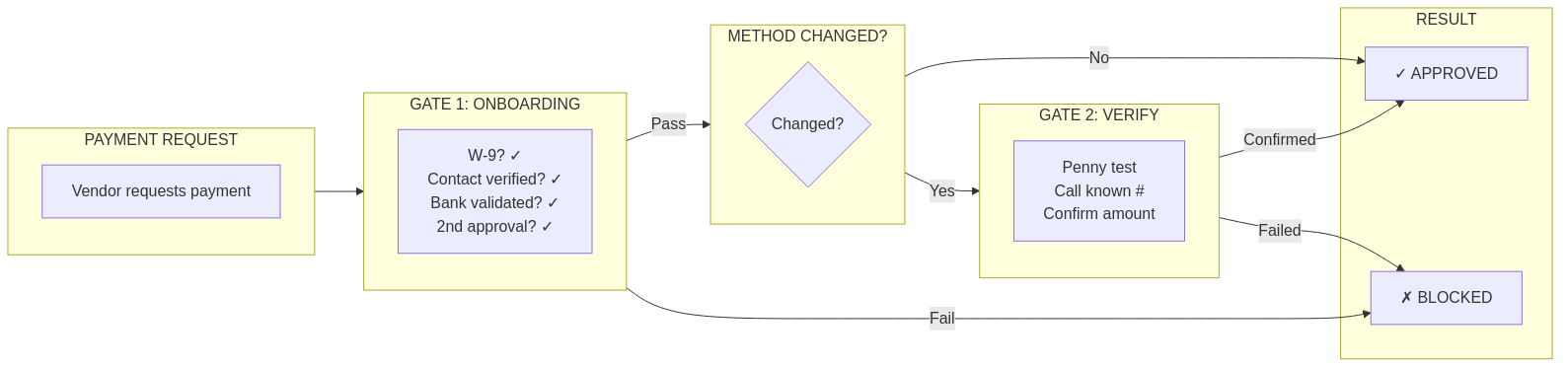
- Vendor Verification Workflow (PDF) – Prevent payment fraud
- IT Security Basics Checklist (PDF) – Protect your systems
- Asset Verification Procedure (PDF) – Confirm what you own
The Three Types of Controls
Understanding control types helps you build a complete defense:
1. Preventive Controls
Purpose: Stop problems before they happen
| Control | What It Prevents | Example |
|---|---|---|
| Approval thresholds | Unauthorized spending | “Purchases >$1,000 need owner approval” |
| Segregation of duties | Single-person fraud | Different people approve and pay |
| Vendor verification | Payment to fake vendors | Verify new vendor identity before payment |
| Access controls | Unauthorized changes | Limit who can modify vendor bank info |
2. Detective Controls
Purpose: Catch problems quickly
| Control | What It Detects | Example |
|---|---|---|
| Bank reconciliation | Unauthorized transactions | Monthly comparison to bank records |
| Exception reports | Policy violations | Flagging expenses without documentation |
| Variance analysis | Unusual patterns | “Expenses 40% above budget—why?” |
| Audit trails | Who did what when | Logging all changes to financial records |
3. Corrective Controls
Purpose: Fix problems and prevent recurrence
| Control | What It Corrects | Example |
|---|---|---|
| Error correction process | Mistakes caught | Documented procedure for fixing entries |
| Incident response | Fraud discovered | Steps to take when fraud is suspected |
| Process improvement | Recurring issues | Update controls after each incident |
| Training updates | Knowledge gaps | Educate staff on new threats |
The $85,000 Email: A Real Story
An accounts payable clerk received this email:
From: Michael Thompson <m.thompson@goog1e.com>
To: AP Team
Subject: Urgent Wire Transfer - Confidential

Hi,

I need you to process a wire transfer for $85,000 to
finalize the acquisition we discussed. This is time-
sensitive and confidential—please don't discuss with
others until the deal closes.

Wire to:
Bank: First National Bank
Account: 8847291056
Routing: 021000021

Please confirm when sent.

Thanks,
Michael Thompson
CEO
What went wrong: 1. Email looked legitimate (CEO’s name, professional tone) 2. “Confidential” discouraged verification 3. Urgency bypassed normal approval process 4. No control required verbal confirmation for large wires
What controls would have prevented this: – Verbal confirmation for wire transfers >$10,000 – Multi-person approval for large payments – Email verification training (notice “goog1e” not “google”) – Established vendor requirement for all payments
Outcome: $85,000 sent to fraudsters, unrecoverable.
How Invoice #4847 Is Protected
The same controls that make Invoice #4847 Tax Ready also prevent fraud:
| Control | How It Protects |
|---|---|
| Vendor verification | ABC Office Solutions verified as legitimate vendor |
| Approval workflow | Manager reviews because amount >$2,000 |
| Documentation requirement | Business purpose must be recorded |
| Audit trail | Every action logged with who/what/when |
| Duplicate detection | System flags if same invoice entered twice |
| Bank info verification | Payment goes to verified account |
Result: If Invoice #4847 were fraudulent, multiple controls would flag it before payment.
The 5 Controls Every Small Business Needs
Start here—these provide 80% of protection with 20% of effort:
1. Segregation of Duties
The Rule: No single person should control an entire transaction.
| Task | Person A | Person B |
|---|---|---|
| Create vendor | ✓ | |
| Approve vendor | ✓ | |
| Enter invoice | ✓ | |
| Approve payment | ✓ | |
| Release payment | ✓ (below threshold) | ✓ (above threshold) |
For very small businesses: Owner reviews all payments even if staff enters them.
2. Bank Reconciliation (Monthly, Minimum)
The Rule: Compare your books to the bank within 30 days.
| Benefit | What It Catches |
|---|---|
| Unauthorized transactions | Checks you didn’t write |
| Timing differences | Outstanding checks, deposits in transit |
| Errors | Data entry mistakes |
| Fraud | Unusual activity patterns |
Pro Tip: Weekly reconciliation catches problems faster.
3. Approval Thresholds
The Rule: Large transactions require additional approval.
| Amount | Required Approval |
|---|---|
| <$500 | Staff can process |
| $500-$2,000 | Manager approval |
| $2,000-$10,000 | Owner approval |
| >$10,000 | Dual approval (owner + manager) |
Adjust thresholds for your business size and risk tolerance.
4. Vendor Verification
The Rule: Verify new vendors before first payment.
| Verification | Purpose |
|---|---|
| W-9 on file | Legal identity confirmed |
| Address verified | Physical location exists |
| Phone verified | Can reach actual contact |
| Bank info verified | Payment goes to right place |
Pro Tip: When vendors request bank account changes, verify via phone using a number you already have—not the number in the change request.
5. Access Controls
The Rule: Limit system access to what each person needs.
| Role | Access Level |
|---|---|
| Data entry clerk | Enter transactions, view reports |
| Bookkeeper | Enter, edit, run reports, reconcile |
| Manager | Above + approve transactions |
| Owner | Full access + user management |
Regularly review: Who has access? Do they still need it?
Positive Pay: Your Best Defense Against Check Fraud
What is Positive Pay? A bank service that matches checks presented for payment against a list you provide. If a check doesn’t match, the bank alerts you before paying.
How it works: 1. You issue check #1234 for $500 to ABC Company 2. You upload check details to bank (number, amount, payee) 3. Someone presents check #1234 for $5,000 (altered) 4. Bank sees mismatch, holds payment, alerts you 5. You reject the fraudulent check
Cost: Usually $25-75/month for small business ROI: One prevented fraud pays for years of service
Pro Tip: Ask your bank about Positive Pay today. It’s one of the most cost-effective fraud controls available.
Simple Risk Indicators to Watch
Train yourself (and your team) to notice these red flags:
Email Red Flags
Sender domain slightly off (goog1e vs google)
Urgency + confidentiality combination
Request to bypass normal processes
Wire transfer requests via email only
Grammar/spelling errors in “official” communications
Vendor Red Flags
P.O. Box only, no physical address
Reluctance to provide W-9
Bank account changes (especially urgent ones)
Invoice amounts slightly below approval thresholds
Services that can’t be verified
Transaction Red Flags
Round-number amounts ($1,000, $5,000)
Just below approval thresholds ($1,999, $4,999)
Same amount, multiple transactions
Weekend/holiday submissions
Rush payment requests
Behavioral Red Flags
Employee reluctant to take vacation
Defensive about their processes
Living beyond apparent means
Unusual hours or access patterns
Resistance to controls or audits
IT Security Basics for Financial Systems
Your financial data is only as secure as your IT practices:
Multi-Factor Authentication (MFA)
Enable MFA on: – [ ] QuickBooks Online – [ ] Bank accounts – [ ] Email (especially AP staff) – [ ] Payroll systems – [ ] Any system with financial data
Cost: Free (usually built-in) Protection: Prevents 99% of account takeover attacks
Access Review (Quarterly)
Check: – [ ] Who has access to QBO? Still needed? – [ ] Who has access to bank accounts? Still needed? – [ ] Any former employees still have access? – [ ] Are permission levels appropriate?
Password Hygiene
Unique passwords for financial systems
Password manager in use
No shared accounts/passwords
Regular password updates (annually minimum)
Backup and Recovery
QBO data backed up (automatic in QBO)
Local documents backed up
Recovery process tested
Ransomware protection in place
Asset Verification: Trust But Verify
Your balance sheet shows assets. But do they exist?
Annual Physical Verification
Fixed assets: Are they where they should be?
Inventory: Does count match records?
Bank accounts: Do all accounts belong to the company?
Vehicles: Are titled vehicles accounted for?
Common Issues Found
| Issue | What It Indicates |
|---|---|
| Asset missing | Theft, disposal without recording |
| Asset not on books | Purchase not recorded, donation |
| Asset in wrong location | Tracking problem |
| Condition different than expected | Impairment, depreciation adjustment needed |
Making Controls Painless
Controls that slow business down get bypassed. Design for adoption:
Principles for Effective Controls
| Principle | Application |
|---|---|
| Make the right thing easy | Default to correct behavior |
| Make the wrong thing hard | Require extra steps to bypass |
| Automate where possible | Reduce human friction |
| Explain the why | People follow rules they understand |
| Audit without accusations | Regular checks, not suspicion |
Example: Expense Approval
Bad design: Fill out paper form → find manager → get signature → submit to AP → wait for reimbursement
Good design: Submit via app → auto-routes to manager → one-click approval → direct deposit
Same control (manager approval), dramatically different user experience.
Key Takeaways
- Controls are insurance – You don’t appreciate them until you need them
- Three types work together – Preventive, detective, corrective
- Start with 5 basics – Segregation, reconciliation, approval, verification, access
- Positive Pay is a bargain – Ask your bank today
- Watch for red flags – Train yourself and your team
- Make controls painless – Adoption beats perfection
Your Next Step
Pick ONE control from the “5 Controls Every Business Needs” and implement it this week:
Easiest to start: Enable MFA on your QuickBooks Online account (Settings → Security).
Highest impact: Set up bank reconciliation on a schedule (even if monthly to start).
Want a control assessment? Apply for a complimentary Tax Ready Assessment – we’ll evaluate your current controls and recommend improvements.