
AI Agents as Virtual Bookkeeping Staff
Key Concept
The goal isn’t to replace your bookkeeper with AI. It’s to give your bookkeeper AI superpowers.
AI Agents: Software that performs tasks autonomously—reading documents, classifying data, making suggestions—and learns from corrections.
Figures (Full Resolution)
Figure 7.1: AI Agent Processing Flow
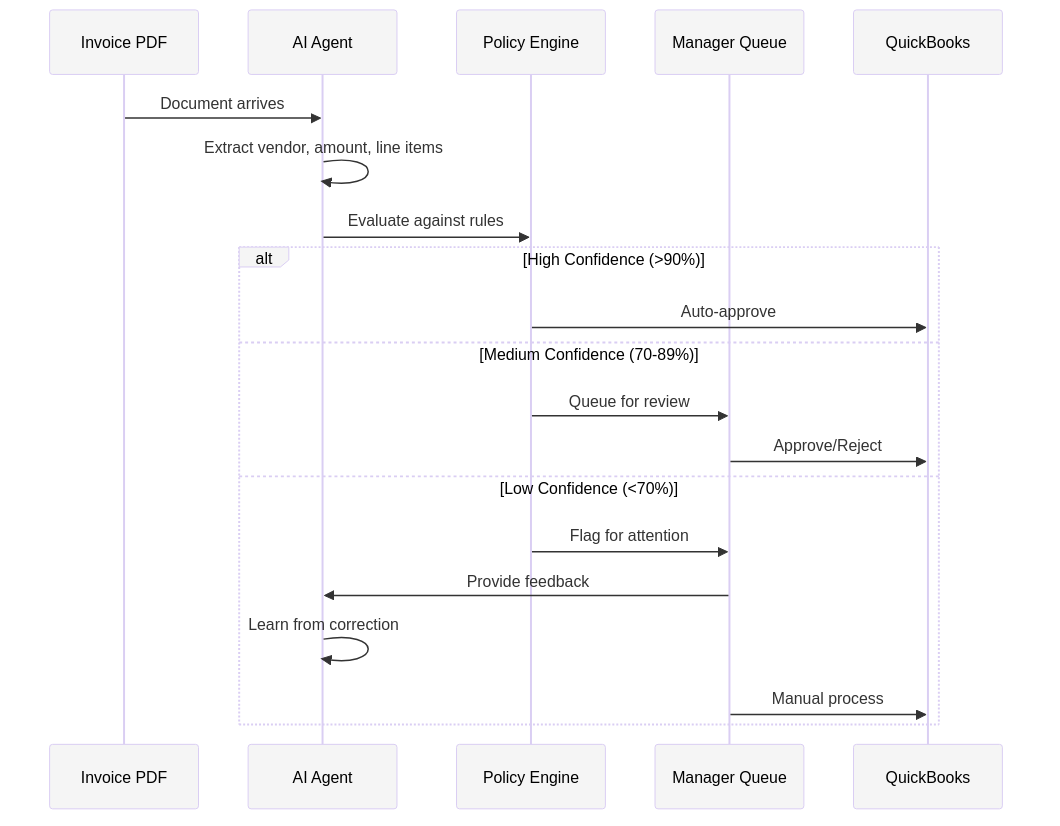 How an AI agent processes Invoice #4847: document intake, data extraction, classification, policy check, confidence scoring, and routing.
Downloadable Resources
Implementation Guides
- AI Agent Capability Overview (PDF) – What AI can and can’t do for bookkeeping
- Confidence Threshold Guide (PDF) – When to trust AI, when to verify
- Human-in-the-Loop Workflow (PDF) – Balancing automation with oversight
- Privacy and Data Security Checklist (PDF) – Protecting your financial data
What AI Agents Actually Do
AI agents in bookkeeping aren’t magic—they’re pattern recognition at scale. Here’s what they’re good at:
High Confidence Tasks (>90% accuracy)
| Task | What AI Does | Human Role |
|---|---|---|
| Document reading | Extract text from invoices, receipts, statements | Verify edge cases |
| Data entry | Populate fields from extracted data | Review flagged items |
| Categorization | Suggest expense accounts based on patterns | Approve or correct |
| Duplicate detection | Flag potential duplicate transactions | Confirm or dismiss |
| Vendor matching | Match invoices to existing vendors | Handle new vendors |
Medium Confidence Tasks (70-90% accuracy)
| Task | What AI Does | Human Role |
|---|---|---|
| Business purpose | Suggest purpose based on vendor/amount | Verify or edit |
| Project coding | Suggest project/class based on patterns | Confirm allocation |
| Anomaly detection | Flag unusual transactions | Investigate |
| Receipt matching | Match receipts to transactions | Handle mismatches |
Low Confidence Tasks (Human Required)
| Task | Why AI Struggles | Human Role |
|---|---|---|
| Judgment calls | Context-dependent decisions | Make the call |
| Policy exceptions | Requires business knowledge | Approve or deny |
| New vendor setup | Verification required | Complete onboarding |
| Complex allocations | Multiple valid options | Decide allocation |
How Invoice #4847 Gets Processed by AI
When Invoice #4847 arrives as a PDF attachment:
Step 1: Document Intake
AI Action: Detect document type (invoice vs receipt vs statement)
Result: Invoice detected
Confidence: 98%
Step 2: Data Extraction
AI Action: Extract key fields
Results:
  - Vendor: ABC Office Solutions (95% confidence)
  - Amount: $2,340.00 (99% confidence)
  - Date: 2024-11-15 (99% confidence)
  - Invoice #: 4847 (97% confidence)
  - Line items: 3 detected (92% confidence)
Step 3: Vendor Matching
AI Action: Match to existing vendor
Result: Matched to "ABC Office Solutions" (ID: V-1847)
Confidence: 94%
Verification: TIN matches, address matches
Step 4: Categorization
AI Action: Suggest expense account
Result: 6330 - Office Supplies
Confidence: 87%
Reasoning: Vendor category + line item keywords
Step 5: Policy Check
AI Action: Evaluate against policies
Findings:
  - Amount > $2,000: Requires manager approval
  - Business purpose: Not provided (flag)
  - Documentation: Invoice attached (pass)
Step 6: Routing Decision
AI Action: Determine next step
Decision: Route to manager for approval + request business purpose
Confidence: 95%
Total processing time: 3.2 seconds Human time required: ~30 seconds to review and approve
The Confidence Threshold Framework
Not all AI suggestions are equally reliable. Use confidence thresholds to decide when to trust AI:
| Confidence Level | Threshold | Action |
|---|---|---|
| High | >95% | Auto-approve, log for audit |
| Medium-High | 85-95% | Auto-approve with review flag |
| Medium | 70-85% | Queue for human review |
| Low | <70% | Require human decision |
Adjusting Thresholds
| Scenario | Adjust Thresholds |
|---|---|
| New AI deployment | Start conservative (higher thresholds) |
| Proven accuracy | Gradually lower thresholds |
| High-risk transactions | Keep thresholds high regardless |
| New vendor types | Reset to conservative |
The Learning Loop
AI agents improve over time through corrections:
1. AI makes suggestion (Category: Office Supplies)
2. Human corrects (Actually: Computer Equipment)
3. AI logs correction with context
4. Pattern updated for future similar transactions
5. Next similar invoice: AI suggests Computer Equipment
What AI Learns From
| Input | What AI Learns |
|---|---|
| Corrections | “This vendor type → this category” |
| Approvals | “This pattern is acceptable” |
| Rejections | “This pattern needs human review” |
| Exceptions | “These situations are complex” |
What AI Doesn’t Learn
- Business context you haven’t taught it
- Policy changes (until you update rules)
- One-time exceptions (correctly ignores outliers)
- Your preferences (unless explicitly captured)
Human-in-the-Loop: Why It Matters
Pure automation sounds appealing but creates risk: – Errors compound without detection – Fraud can slip through – Unusual situations mishandled – No accountability
Human-in-the-loop provides: – Oversight at key decision points – Correction mechanism for AI learning – Accountability for approvals – Judgment where needed
The Right Balance
| Transaction Type | AI Role | Human Role |
|---|---|---|
| Routine, low-value | Process automatically | Spot-check samples |
| Routine, high-value | Process + flag | Review before posting |
| Unusual, low-value | Suggest + queue | Review and decide |
| Unusual, high-value | Flag immediately | Full review required |
What AI Agents Don’t Do Well
Be realistic about AI limitations:
1. Complex Judgment
AI can’t understand why you’re making an exception. It follows patterns, not reasoning.
2. Relationship Context
AI doesn’t know that “this vendor is our CEO’s brother-in-law” or “we’re trying to reduce spending with this supplier.”
3. Strategic Decisions
“Should we prepay this expense for tax purposes?” requires business context AI doesn’t have.
4. Unusual Situations
First-time events, rare transactions, and edge cases often need human judgment.
5. External Verification
AI can flag that a vendor’s bank account changed, but can’t call to verify it’s legitimate.
When AI Is Not the Answer
Not every bookkeeping problem needs AI. Ask yourself:
| Question | If Yes… |
|---|---|
| Is the problem consistency? | Start with checklists and SOPs |
| Is the problem volume? | Consider outsourcing first |
| Is the problem complexity? | Simplify before automating |
| Is the problem training? | Train your team first |
| Is the problem unclear processes? | Document processes first |
AI amplifies your system. If your system is broken, AI will break faster.
Privacy and Data Security
Your financial data is sensitive. Before implementing AI:
Questions to Ask
| Question | Why It Matters |
|---|---|
| Where is data processed? | Cloud vs. on-premise affects privacy |
| Who can access the data? | Vendor employees, AI training? |
| How long is data retained? | Your data, their servers |
| Is data used for training? | Your patterns training competitors? |
| What happens if vendor is breached? | Your exposure |
Privacy Options
| Option | Privacy Level | Trade-off |
|---|---|---|
| Public cloud AI | Lower | Easiest, cheapest, fastest |
| Private cloud instance | Medium | More control, higher cost |
| On-premise AI | Highest | Full control, significant investment |
| Hybrid approach | Configurable | Sensitive data local, routine in cloud |
Pro Tip: For most small businesses, a reputable cloud provider with proper contracts (BAA, DPA) provides adequate protection. Don’t let perfect be the enemy of good.
Case Study: AI-Assisted Bookkeeping
Client: Marketing agency, 25 employees, 400+ transactions/month
Before AI Implementation
- 2 full-time bookkeeping staff
- 3-week close cycle
- 8% error rate requiring correction
- 15 hours/month on receipt matching
After AI Implementation
- 1.5 FTE bookkeeping (0.5 FTE redeployed to analysis)
- 5-day close cycle
- 1.2% error rate
- 2 hours/month on receipt matching
ROI Breakdown
| Metric | Before | After | Savings |
|---|---|---|---|
| Staff time | 320 hrs/month | 240 hrs/month | 80 hrs |
| Error correction | 25 hrs/month | 4 hrs/month | 21 hrs |
| Close cycle | 15 business days | 5 business days | 10 days |
| Receipt matching | 15 hrs/month | 2 hrs/month | 13 hrs |
Total time saved: 114 hours/month Redeployed to: Financial analysis, client reporting, process improvement
Questions to Ask Before Deploying AI
- What problem are we solving? (Be specific)
- Do we have clean data to train on? (Garbage in = garbage out)
- Who will review AI suggestions? (Human-in-the-loop)
- What’s our confidence threshold? (When to trust vs. verify)
- How will we measure success? (Error rate, time saved, etc.)
- What’s the privacy/security posture? (Where does data go?)
- What happens when AI is wrong? (Correction process)
- Do we have volume to justify AI? (ROI calculation)
Key Takeaways
- AI augments, not replaces – Your bookkeeper with AI is better than AI alone
- Confidence thresholds matter – Know when to trust, when to verify
- The learning loop improves accuracy – Corrections make AI smarter
- Human-in-the-loop is essential – Oversight prevents compounding errors
- Not every problem needs AI – Fix processes first, then automate
- Privacy requires attention – Know where your data goes
Your Next Step
Before considering AI, answer this question:
“If I had an infinitely fast, perfectly accurate human doing data entry, what would my remaining problems be?”
If the answer is “not much”—AI might help. If the answer involves unclear processes, inconsistent policies, or undefined standards—fix those first.
Want to explore AI for your bookkeeping? Apply for a complimentary Tax Ready Assessment – we’ll help you determine if AI makes sense for your situation.