
The AI Governance & Security Series
★ Start here (the story), then read Parts 1–7 in order.
| # | Post | Read |
|---|---|---|
| ★ | AI Sorcery: Don’t Be the Apprentice | Read |
| 1 | The Ledger Question | Read |
| 2 | Can You Prove What Your AI Did to the Books Last Night? | Read |
| 3 | The Boundary a Local AI Model Won’t Give You | Read |
| 4 | What Quantum Computing Does to Your AI Audit Trail | Read |
| 5 | Something You Know, Have, or Are (you are here) | — |
| 6 | Lock the Front Door: Secure Your QuickBooks Login | Read |
| 7 | The Back Door: Who Can Reach Into Your Books | Read |
Something You Know, Have, or Are: The Idea Behind Every Login
Part 5 of the ProjectBits AI Governance & Security series, and the foundation for the two posts that follow it. Before we tell you which locks to put on your QuickBooks account, it helps to understand what a “lock” even is — and why the strongest one available rests on a piece of math nobody can undo.
Every login is really asking one question
When you sign in to anything — your bank, your email, your books — the system is trying to answer a single question: are you really you?
For decades, security experts have grouped every possible way of proving that into just three categories. They’re worth knowing, because once you see them, every login screen you’ll ever meet suddenly makes sense.
The three factors
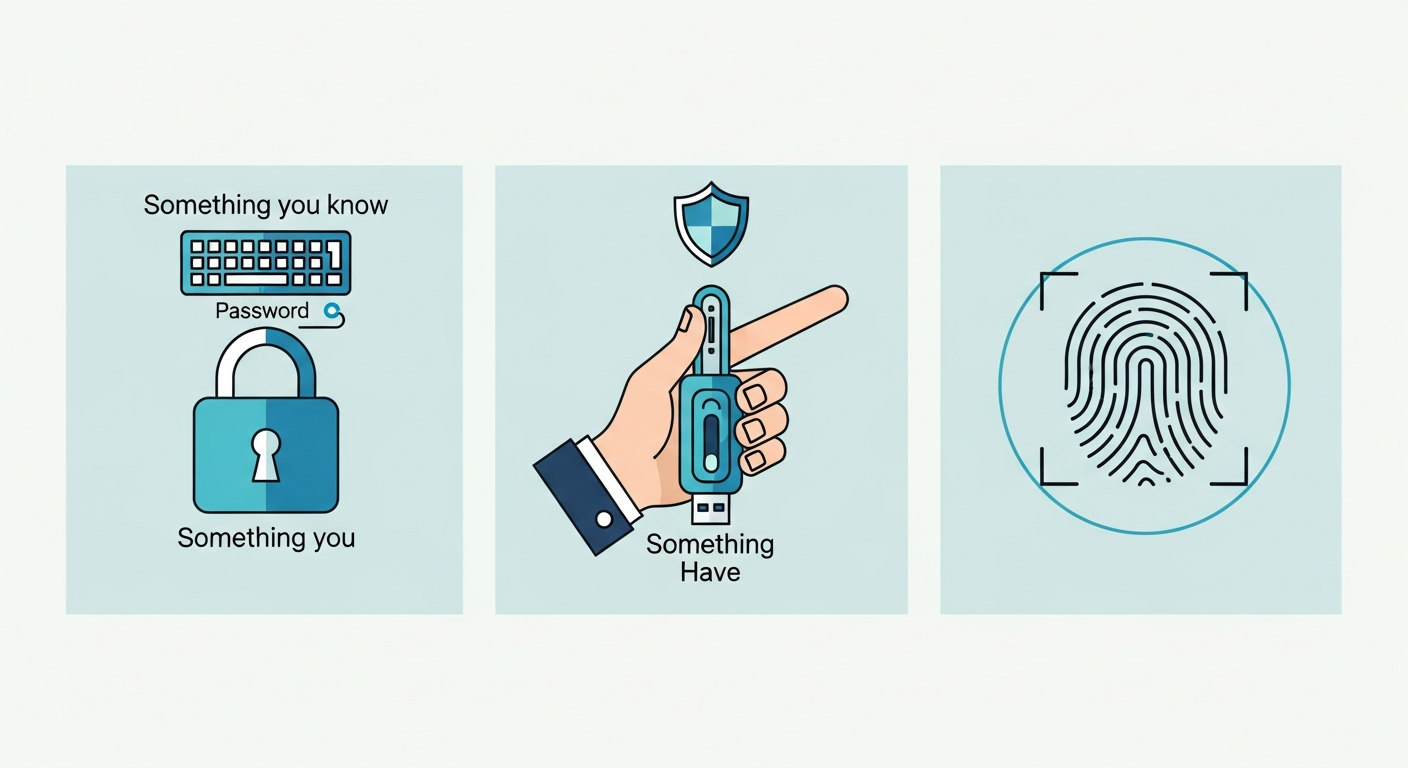
1. Something you know. A password. A PIN. The answer to “what was your first pet’s name.” It lives in your head.
The weakness is obvious once you say it out loud: anything you know can be learned by someone else. Guessed, stolen in a breach, phished out of you with a convincing email, or simply reused from another site that got hacked. Knowledge can be copied without you ever noticing it’s gone.
2. Something you have. A physical thing in your possession — your phone, or a small hardware security key. The system trusts that you are the one holding it.
This is much stronger, because a thief now needs the actual object, not just a piece of information. They can’t phish a physical key out of you over email.
3. Something you are. Your fingerprint. Your face. A part of you that’s hard to fake and impossible to forget at home.
Why “multi-factor” is the whole game
Here’s the key insight: each factor has a different weakness, so combining two from different categories is dramatically stronger than doubling up within one.
A password plus a second password is still just two things you know — one phishing email can grab both. But a password (know) plus a tap on your phone (have) plus your fingerprint (are)? An attacker would need to steal your knowledge, your device, and your body, all at once. That’s the entire point of what the industry calls multi-factor authentication — you’re not stacking more of the same lock, you’re stacking different kinds of lock.
This is why “add a text-message code to your password” was a real step forward: it added a second, different factor. And it’s why the newer options are better still — they make the “something you have” factor nearly impossible to fake. Which brings us to the quiet piece of math that makes that possible.
The math that lets you prove you have something — without ever showing it
The strongest logins today (passkeys and hardware security keys) rest on an idea called public-key cryptography. It sounds academic, but the reason it exists is beautifully practical, and it comes down to a simple fact about computers: some math is easy to do in one direction and effectively impossible to undo in the other.
Think of mixing two colors of paint. Blending them takes a second. But hand someone the mixed color and ask them to tell you the exact two shades that went in — good luck. The mixing is easy; the un-mixing is, for all practical purposes, impossible.
Public-key cryptography is built on math that behaves exactly like that. It lets your device create a matched pair: a public key and a private key.
- The public key is like that mixed paint color — safe to hand out to the whole world. QuickBooks keeps a copy. So does anyone who wants it. It gives nothing away.
- The private key never leaves your device. It’s the one thing that can answer a challenge the public key poses.
When you sign in, QuickBooks uses its copy of your public key to pose a puzzle only your private key can solve. Your device solves it — that’s your fingerprint tap — and sends back the proof. You’ve proven you hold the private key without ever transmitting it. There’s nothing on the wire for an attacker to grab, nothing sitting on QuickBooks’ servers for a breach to leak.
And here’s why it matters that the math can’t be run backward: even though the whole world can see your public key, no computer can work back from it to figure out your private key. The one-way street protects you. This isn’t a company promise or a policy — it’s arithmetic. That’s a fundamentally sturdier thing to trust than “we pinky-swear we stored your password safely.”
Why this makes “something you have” nearly perfect
Remember the three factors. A password (know) can be copied because knowledge copies freely. A text-message code is better, but the code still travels — it can be intercepted or phished in the moment.
A hardware security key turns “something you have” into something an attacker essentially cannot replicate. The private key was born on that device and can never leave it. There’s no code to intercept, no secret to phish, no server-side copy to steal, and no way to reverse-engineer it from the public key. To defeat it, someone would have to physically take the key out of your hand.
That’s the payoff of the math: it makes possession provable without making possession stealable.
Where we go from here
You now have the mental model that the rest of this series builds on:
- Something you know — the floor, never the whole story.
- Something you have — stronger, and made nearly unbreakable by public-key math.
- Something you are — the fingerprint or face that unlocks the key you hold.
The next post takes this straight to your QuickBooks login — exactly which of these to turn on, in what order, and how, in about ten minutes. The one after that covers the other door into your books: the apps and AI tools you connect, and how to keep them on a short leash.
Principles first, then the practical steps. Read on.
ProjectBits helps small businesses run governed, auditable financial operations — books you can trust and prove. Get in touch.
Are You Ready to Take Control of Your Business Finances?
Most back-office problems don’t live where owners look for them first — not in the tool, not in the person, but in the handoffs and decisions nobody ever made explicit. At ProjectBits Consulting, Tax Ready Bookkeeping starts with a structured diagnostic: we put a number on each part of your books, name what’s actually plateaued, and show you the receipts before recommending any work. You leave with a clear picture you can act on — whether you work with us or not.
The diagnostic precedes the remedy. The Tax Ready Assessment is the front door — a no-obligation walk through where your books actually stand this month. Apply now for your Tax Ready Assessment, or explore the thinking behind it in our book, Ready to Take Control of Your Business Finances.

Companion piece: for the plain-language, owner-first version of these ideas — where a business owner reasons his way to phishing-resistant identity himself — see How I Learned to Read My Business’s Vital Signs.